
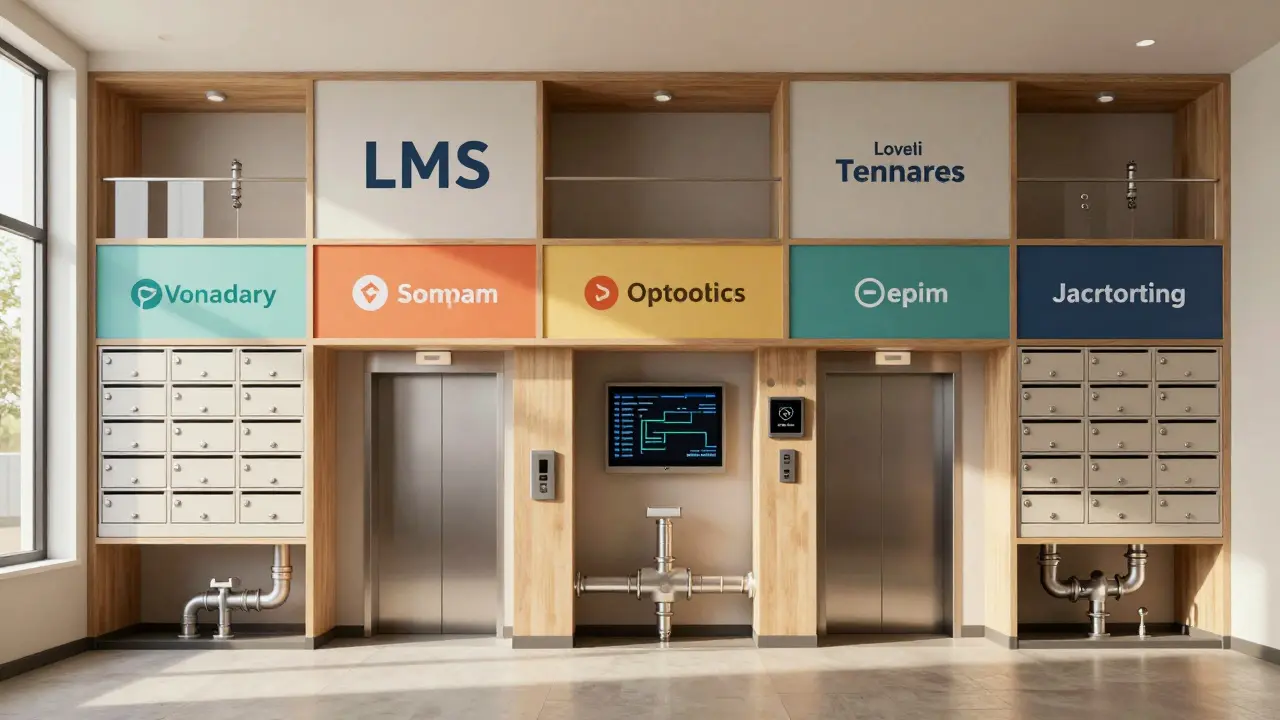
When you’re building or choosing a Learning Management System (LMS) for multiple schools, departments, or companies, you can’t just slap one setup on everyone and call it done. That’s where multi-tenancy comes in - a design that lets one instance of your LMS serve many separate groups, each with their own data, branding, users, and rules. But getting it right? That’s where most projects stumble.
What Multi-Tenancy Actually Means for an LMS
Multi-tenancy isn’t just about saving server costs. It’s about letting each customer - or tenant - feel like they’re the only one using the system. A university department needs its own course catalog. A corporate training team needs custom compliance modules. A charter school needs its own grading scale. All of them run on the same codebase, but none of them see each other’s data. That’s the goal.
Think of it like an apartment building. Each unit has its own lock, mail slot, and装修 (decoration). The building has one roof, one elevator, and one plumbing system. But you don’t want your neighbor’s laundry list showing up in your inbox. That’s multi-tenancy: shared infrastructure, private experience.
Key Challenges in LMS Multi-Tenancy
Building a multi-tenant LMS sounds simple until you hit the real-world mess. Here’s what breaks most teams:
- Data leakage - One tenant accidentally sees another tenant’s grades, roster, or private messages. This isn’t just embarrassing - it’s a legal nightmare under GDPR and FERPA.
- Performance crashes - One tenant runs a 500-student quiz at 8 a.m., and suddenly everyone’s system slows to a crawl. No tenant should be able to drag down the whole platform.
- Customization chaos - Tenant A wants a red theme and quiz timers. Tenant B needs Arabic language support and SCORM 1.2 compatibility. Tenant C just wants to disable forums. Managing these without breaking everything? Hard.
- Updates that break things - You push a new feature for Tenant A, but it breaks Tenant B’s custom grading plugin. Rolling back isn’t always possible.
These aren’t theoretical problems. A UK college switched LMS vendors in 2023 after a data mix-up between two partner schools. One student’s final exam results appeared in another school’s portal. The fallout cost them over £120,000 in legal fees and reputational damage.
Architectural Choices: Shared vs. Isolated
There are three main ways to build multi-tenancy - and each has trade-offs.
| Approach | Pros | Cons |
|---|---|---|
| Shared Database, Shared Schema | Lowest cost, easiest to maintain, fastest updates | High risk of data leaks, hard to customize, one tenant’s bad query can crash everything |
| Shared Database, Separate Schemas | Better isolation, easier to customize per tenant | Still shares server resources, harder to scale, complex backups |
| Separate Databases per Tenant | Maximum isolation, full customization, no cross-tenant impact | Expensive to manage, slow updates, complex monitoring |
Most enterprise LMS platforms - like Moodle Cloud, Canvas, and Docebo - use shared database with separate schemas. It’s the sweet spot: cost-effective without sacrificing too much safety. Startups often go for shared database + shared schema to save money, but they regret it by Year 2.

Security and Compliance Are Non-Negotiable
If your LMS handles student records, employee training logs, or health certifications, you’re bound by strict rules. In the UK, GDPR and the Data Protection Act 2018 apply. In the US, FERPA protects student data. In healthcare, HIPAA might be in play.
Multi-tenancy doesn’t excuse you from compliance - it makes it harder. Here’s what you need:
- Strict row-level security - Every database query must include a tenant ID. No exceptions.
- Automated audit logs - Track every access, export, or deletion. Who saw what, when, and from where.
- Zero data sharing in backups - Backups must be tenant-isolated. A backup file can’t contain data from two tenants.
- Encryption at rest and in transit - Even if someone breaks into your server, they shouldn’t be able to read another tenant’s data.
One Scottish college used a cheap LMS vendor that didn’t enforce tenant isolation properly. An admin accidentally exported a CSV of all users - including another school’s staff emails and student IDs. The Information Commissioner’s Office fined them £85,000. The vendor walked away. The college had to rebuild everything.
Performance and Scalability Realities
Multi-tenancy looks great on paper until 10,000 students log in at 7:45 a.m. to take a quiz. That’s when you find out your system can’t handle load spikes.
Here’s how to prepare:
- Use a content delivery network (CDN) - Serve videos, images, and static files from edge servers. Don’t let one tenant’s media library slow down everyone else.
- Rate limiting per tenant - If Tenant A tries to download 10,000 files in 30 seconds, block them before they crash the server.
- Database indexing by tenant ID - Without it, every search scans the whole database. With it, queries run in milliseconds.
- Separate queues for heavy tasks - Video encoding, grade exports, and bulk imports should run in background workers, not the main app.
Canvas, used by over 100 million learners, runs on a system that isolates heavy processes by tenant. If one university runs a massive exam export, it doesn’t touch the login servers for another.
Customization Without Chaos
Not every tenant needs the same features. Some want gamification. Others need accessibility tools. Some just want to turn off the chat.
Here’s how to handle it cleanly:
- Feature flags - Turn features on/off per tenant without deploying new code. Use tools like LaunchDarkly or build your own.
- Theme engine - Let tenants upload logos, colors, and fonts. Store them in tenant-specific folders. Don’t let them edit core CSS files.
- Plugin marketplace - Allow tenants to install approved plugins. But require testing and approval before deployment.
- Configuration profiles - Pre-set templates: "High School", "Corporate Compliance", "University Research". Tenants pick one, then tweak.
Don’t let tenants edit the core code. Ever. One client in Manchester tried to "fix" their LMS by modifying the JavaScript. It broke the login system for 3,000 users. Took three days to fix.

How to Test Before You Launch
You can’t just trust your code. You need to break it - on purpose.
Run these tests before going live:
- Isolation test - Log in as Tenant A, search for Tenant B’s course ID. You should get zero results.
- Load test - Simulate 5,000 users from 10 different tenants logging in and taking quizzes at the same time.
- Update test - Push a change to one tenant’s environment. Does it affect others? Does the system roll back cleanly if it fails?
- Backup restore test - Delete Tenant C’s data. Restore from backup. Did you get only their data back? Or did Tenant D’s data sneak in?
- API access test - Use a developer key for Tenant A. Can you pull data from Tenant B? You shouldn’t be able to.
One UK training provider skipped these tests. Two months after launch, a tenant’s HR data was exposed through a misconfigured API endpoint. They lost their contract with a major NHS trust.
When Multi-Tenancy Isn’t the Right Choice
Not every LMS needs to be multi-tenant. If you’re building a system for a single organization - say, a large company with 50 departments - you might be better off with a single-tenant setup. It’s simpler, cheaper, and easier to customize.
Multi-tenancy adds complexity. Only use it if:
- You’re selling the LMS to multiple customers
- You’re serving independent schools, colleges, or departments
- You need to enforce strict data separation
- You’re planning to scale beyond one client
If you’re just managing internal training for your own company? Skip the multi-tenant architecture. Use a single instance with role-based access. You’ll save months of development and avoid a ton of risk.
Final Checklist for LMS Multi-Tenancy
Before you sign off on your LMS implementation, run through this:
- ✅ Tenant ID is enforced on every database query
- ✅ No tenant can access another’s data via URL, API, or export
- ✅ Custom themes and plugins are sandboxed
- ✅ Performance monitoring tracks per-tenant usage
- ✅ Backups are tenant-isolated and encrypted
- ✅ Audit logs capture all data access by tenant
- ✅ Feature flags allow granular control per tenant
- ✅ You’ve tested isolation under real-world load
Getting multi-tenancy right isn’t about being fancy. It’s about being safe, stable, and scalable. Do it right, and your LMS can serve hundreds of clients without a single data breach. Do it wrong, and you’ll be the cautionary tale at the next EdTech conference.
Is multi-tenancy the same as cloud hosting?
No. Cloud hosting just means your software runs on remote servers. Multi-tenancy is about how you structure data and access within that system. You can host a single-tenant LMS in the cloud. You can also host a multi-tenant LMS on your own servers. They’re separate concepts.
Can I add multi-tenancy to an existing LMS later?
Technically yes, but it’s like rebuilding a house while people are living in it. Most LMS platforms built without multi-tenancy from the start have deeply embedded assumptions about single-user data. Adding it later often requires a full database migration, code rewrite, and months of testing. It’s rarely worth the cost unless you’re scaling to dozens of clients.
What’s the most common mistake in LMS multi-tenancy?
Assuming that just adding a tenant ID to the database is enough. Many teams forget to check it in the application layer - like in API calls, file downloads, or email notifications. A single missing check can expose hundreds of student records. Always test with real data from multiple tenants.
Does multi-tenancy increase costs?
Upfront, yes. You need more robust security, monitoring, and testing. But long-term, it lowers costs per tenant. One server can serve 50 clients instead of 50 separate servers. The savings kick in after about 5-10 tenants. Below that, single-tenant is usually cheaper.
Which LMS platforms handle multi-tenancy well?
Canvas, Moodle Cloud, Docebo, and TalentLMS are known for solid multi-tenant architectures. Open-source platforms like Moodle (self-hosted) can support it, but you’ll need to build or buy the isolation layer yourself. Avoid cheap, custom-built LMS tools unless you have a dedicated security team.

Comments (12)
Megan Blakeman January 30 2026
Wow, this is so spot-on! I've seen so many LMS projects crash because someone thought 'just add a tenant ID' was enough. It's like putting a lock on your door but leaving the window wide open. 😅
Akhil Bellam January 30 2026
Let me be blunt-most startups chasing 'cost savings' with shared-schema architectures are just gambling with student data. You think you're saving $$$ until you're on the front page of The Guardian for leaking 20,000 FERPA records. Pathetic. 🤦♂️
ravi kumar February 1 2026
As someone who built an LMS for 3 Indian colleges, I can say-shared DB with separate schemas is the real sweet spot. We had zero breaches, and updates took 2 hours instead of 2 weeks. No need to over-engineer unless you're serving 50+ tenants.
Amber Swartz February 2 2026
Wait-so you're telling me some vendor just let one school's grades pop up in another school's portal?!?!? That's not a bug, that's a crime. I'm calling my lawyer. And then I'm posting this on LinkedIn. And then I'm crying. 🥲
Robert Byrne February 2 2026
Anyone who says 'just use a CDN' for multi-tenancy doesn't understand the core issue. You're not fixing architecture-you're slapping a bandage on a severed artery. If your queries aren't tenant-scoped at the DB layer, you're already compromised. Stop pretending.
Tia Muzdalifah February 3 2026
my bff in texas just told me her school’s lms did this thing where u could see other schools’ stuff if u typed in the right url… i was like… wait… that’s not a feature? that’s a nightmare?? 😳
Zoe Hill February 5 2026
Love this breakdown! I’ve been on both sides-built a single-tenant system, then had to migrate to multi-tenant. It’s brutal, but worth it if you’re scaling. Just please, for the love of all that’s holy, test your backups. I still have nightmares about that one CSV export…
Albert Navat February 6 2026
Look, if you're not using feature flags with tenant-specific rollouts, you're doing it wrong. I’ve seen devs push global updates and break 12 clients because they didn’t isolate the toggle. It’s not DevOps-it’s DevDisaster. Use LaunchDarkly. Don’t be that guy.
King Medoo February 7 2026
Let me tell you something, and I hope you’re ready for this: multi-tenancy isn’t a technical problem. It’s a moral one. Every time you cut corners on isolation, you’re putting a child’s academic record at risk. And if you don’t feel that weight? Then you shouldn’t be in EdTech. You should be selling cars. 🚗
Rae Blackburn February 7 2026
Did you know the government already knows about this? They’ve got a secret list of all the LMS vendors who’ve had breaches. I saw it. On a dark web forum. Someone posted a screenshot. They’re coming for us. 😨
LeVar Trotter February 8 2026
As someone who mentors new LMS devs, I can’t stress this enough: test isolation like your job depends on it-because it does. Run the same query with tenant A’s ID, then tenant B’s. If you get back anything from B when you’re A? You’ve got a breach waiting to happen. Don’t skip the checklist. Ever.
Tyler Durden February 10 2026
Just one thing-when you say 'skip multi-tenancy if you’re internal'-I totally agree. We did that at my company. Single instance, role-based access, done. Saved us 18 months of dev time and $400k. Don’t overcomplicate what doesn’t need to be complex. Simplicity wins. 💪