

Imagine this scenario: You hire a new employee on Monday. By Wednesday, they are sitting at their desk, ready to work. But when they try to log into your company’s learning platform to start their compliance training, they get an error. Their account doesn’t exist yet. Or worse, you have to manually create it, assign roles, and hope you got the permissions right. This friction is exactly why SCIM (System for Cross-domain Identity Management) has become the gold standard for automating user lifecycle management in modern enterprise software.
If you are managing a Learning Management System (LMS) like Moodle, Canvas, or Cornerstone, manual user management is a silent productivity killer. It leads to orphaned accounts, security risks, and frustrated IT teams. SCIM solves this by creating a standardized language between your identity provider (IdP) and your LMS. In this guide, we will break down how SCIM works, why it matters for education and corporate training, and how to implement it without breaking your existing workflows.
What Is SCIM and Why Does Your LMS Need It?
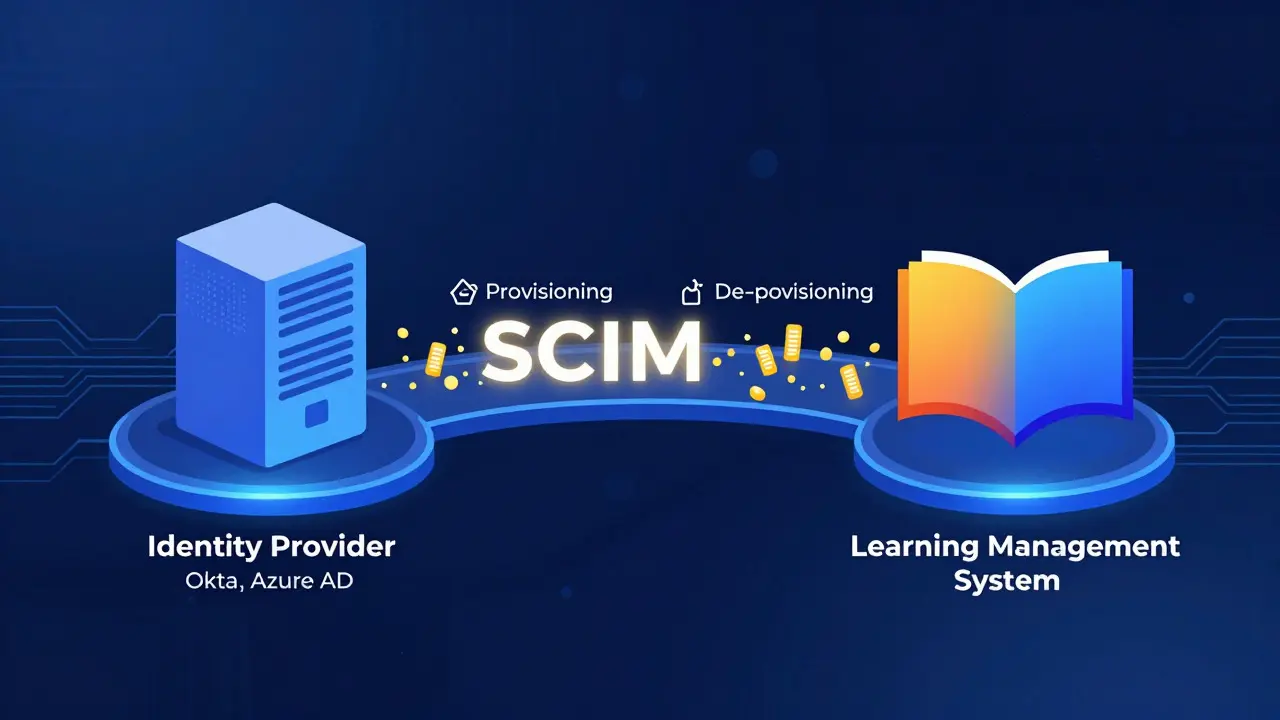
SCIM is an open standard protocol designed to automate the provisioning and de-provisioning of user identities across multiple applications. Think of it as a universal translator for user data. Instead of your HR system speaking one language and your LMS speaking another, SCIM ensures they both understand each other perfectly.
In the context of Learning Platforms, SCIM handles the entire lifecycle of a user:
- Provisioning: Automatically creates an account in the LMS when a new user is added to your central directory (like Active Directory or Okta).
- Updating: Syncs changes such as name updates, role changes, or department transfers in real-time.
- De-provisioning: Instantly disables or deletes access when an employee leaves or a student graduates.
Without SCIM, these tasks require manual CSV uploads or API calls that are prone to human error. With SCIM, the process is event-driven and automatic. If a user is deleted from your IdP, their access to the LMS is revoked within seconds, not days.
The Core Components of SCIM Integration
To understand how SCIM integrates with your LMS, you need to know the two main players involved. The relationship is strictly client-server based.
| Component | Role | Common Examples |
|---|---|---|
| Identity Provider (IdP) | The source of truth for user data. It initiates the SCIM requests. | Okta, Azure AD (Entra ID), OneLogin, Ping Identity |
| Service Provider (SP) | The application receiving the data. In our case, the LMS. | Moodle, Canvas, Docebo, SAP Litmos |
The IdP acts as the controller. When a change occurs in the IdP (e.g., a new hire), it sends an HTTP POST request to the Service Provider's SCIM endpoint. The LMS must have a SCIM-compliant API endpoint to receive and process these commands. Most modern cloud-based LMS platforms support this out of the box, while older on-premise solutions may require plugins or middleware.
Benefits of Automated User Lifecycle Management
Why go through the trouble of setting up SCIM? The benefits extend far beyond just saving time on account creation. Here is what happens when you automate your LMS user management.
1. Enhanced Security Through Immediate De-provisioning
The biggest security risk in any organization is "orphaned accounts"-user profiles that remain active after an employee has left. These accounts can be exploited by former employees or malicious actors. SCIM ensures that when a user is disabled in your primary directory, their access to the LMS is terminated instantly. This reduces the window of vulnerability from days to milliseconds.
2. Reduced Administrative Overhead
IT administrators often spend hours every week manually updating user lists. For large organizations with thousands of learners, this is unsustainable. SCIM automates the bulk of this work. According to industry benchmarks, organizations using SCIM report a 70-90% reduction in time spent on identity administration tasks.
3. Improved Data Accuracy
Manual entry leads to typos. A misspelled email address means a user never receives their course completion certificates. SCIM syncs data directly from the authoritative source, ensuring that names, emails, and organizational units are always correct in the LMS.
4. Seamless Onboarding Experience
New users expect instant access. With SCIM, as soon as a new hire is added to the company directory, their LMS account is created and assigned to the appropriate groups (e.g., "Sales Team" or "New Hires"). They can start learning immediately without waiting for IT support tickets to be resolved.
How SCIM Works: The Technical Flow
Understanding the technical flow helps troubleshoot issues when they arise. SCIM operates over HTTPS and uses JSON for data formatting. Here is the typical sequence of events for a new user.
- User Creation in IdP: An administrator adds a new user to Okta or Azure AD.
- SCIM Trigger: The IdP detects the change and triggers a SCIM event.
- HTTP Request: The IdP sends a POST request to the LMS's SCIM endpoint (usually `/scim/v2/Users`).
- Authentication: The request includes a Bearer token or Basic Auth header to verify the IdP's identity.
- Data Processing: The LMS parses the JSON payload, which contains attributes like `userName`, `emails`, `displayName`, and `groups`.
- Account Provisioning: The LMS creates the user account and assigns them to the specified groups.
- Response: The LMS returns a 201 Created status code to the IdP, confirming success.
If the user already exists, the IdP sends a PUT request to update the record. If the user is deleted, a DELETE request is sent. This RESTful approach makes SCIM predictable and easy to debug.
Common Challenges and Pitfalls
While SCIM is powerful, implementation is not always smooth. Here are common issues you might face and how to avoid them.
Attribute Mapping Errors
Not all LMS platforms use the same field names. Your IdP might send `managerRef`, but your LMS expects `lineManager`. You must carefully map SCIM standard attributes to your LMS's internal schema during configuration. Failure to do so results in incomplete user profiles.
Group Synchronization Complexity
Syncing individual users is straightforward. Syncing groups is harder. Some LMS platforms do not natively support SCIM group provisioning. In these cases, you may need to use custom scripts or middleware to translate group memberships into LMS-specific roles.
Conflicts with Existing Users
If you enable SCIM for users who already exist in the LMS, conflicts can occur. Ensure you perform a clean migration first. Disable manual editing for SCIM-managed users to prevent local changes from being overwritten by the next sync cycle.
Best Practices for Implementation
To ensure a successful rollout, follow these best practices.
- Start Small: Pilot SCIM with a small group of test users before rolling it out to the entire organization.
- Monitor Logs: Enable detailed logging on both the IdP and LMS sides. Watch for failed requests and analyze the error messages.
- Define Clear Ownership: Decide whether the IdP or the LMS is the master for specific attributes. Usually, the IdP should be the master for core identity data (email, name), while the LMS manages learning-specific data (course progress).
- Test De-provisioning: Don't just test adding users. Test removing them. Verify that access is truly revoked and that audit logs reflect the change.
- Document Custom Mappings: Keep a clear record of how SCIM attributes map to your LMS fields. This documentation is crucial for future troubleshooting and audits.
Conclusion
Implementing SCIM for user lifecycle management in learning platforms is no longer optional for growing organizations. It transforms a tedious, error-prone manual process into a secure, automated workflow. By leveraging SCIM, you ensure that your LMS remains a reliable tool for learning rather than a bottleneck for IT. Whether you are using Okta, Azure AD, or another IdP, taking the time to configure SCIM correctly will pay dividends in security, efficiency, and user satisfaction.
Is SCIM supported by all Learning Management Systems?
No, not all LMS platforms support SCIM natively. Major cloud-based providers like Canvas, Docebo, and Cornerstone typically offer built-in SCIM support. Older or smaller on-premise solutions may require third-party plugins or middleware to enable SCIM integration. Always check your LMS vendor's documentation or feature list before starting implementation.
Does SCIM handle Single Sign-On (SSO)?
No, SCIM and SSO are different protocols. SSO (usually via SAML or OIDC) handles authentication (logging in). SCIM handles provisioning (creating and managing accounts). They are often used together: SSO lets users log in seamlessly, while SCIM ensures their account exists and has the right permissions.
How long does it take to set up SCIM for an LMS?
Setup time varies depending on complexity. A basic configuration with a supported IdP and LMS can take 1-2 hours. More complex setups involving custom attribute mapping, group synchronization, or legacy systems may take several days to weeks. Testing and validation should always be included in the timeline.
Can SCIM manage user roles and permissions?
Yes, SCIM can manage roles and permissions through group membership. When a user is added to a group in the IdP (e.g., "Admins"), the LMS can automatically assign the corresponding role (e.g., "Administrator"). However, the level of granularity depends on the LMS's ability to interpret SCIM group data.
What happens if the SCIM connection fails?
If the connection fails, user provisioning stops. New hires won't get accounts, and departures won't trigger de-provisioning. Most IdPs provide alerting mechanisms to notify IT admins of sync failures. It is critical to monitor these alerts and maintain a backup plan for manual provisioning until the issue is resolved.

Comments (14)
Quintin Franzese August 12 2026
So let me get this straight, we spend thousands on Okta and Azure AD just so a script can create an account instead of us clicking 'add user' twice? Sounds like enterprise bloat to me.
Zach Loescher August 13 2026
I've been looking into SCIM for our Moodle instance because the manual CSV uploads were getting out of hand. The part about attribute mapping errors really resonated with me since we had issues with manager fields not syncing correctly last quarter. It's interesting how many people overlook the group synchronization complexity until they are already deep in the implementation phase. I think starting small is definitely the way to go rather than trying to migrate everyone at once.
Tamara Miller August 14 2026
You really need to pay attention to the de-provisioning aspect., honestly it is the most critical part for security., if you leave orphaned accounts active you are basically inviting hackers into your system., it is negligent to ignore this fact.,
Kyle Ware August 15 2026
SCIM is standard now for a reason. Just map the attributes carefully and test the delete flow.
Anthony Miller August 16 2026
The article fails to mention that most legacy LMS systems are garbage anyway why bother automating a broken process unless you fix the underlying architecture first which nobody does
Jeff Falcon August 18 2026
I have to say, the section on technical flow was incredibly helpful for understanding exactly what happens behind the scenes when a new hire joins the team, and it made me realize that we might be missing some steps in our current setup where we rely too much on manual verification before allowing access, which defeats the whole purpose of automation in the first place, but I suppose it takes time to build trust in the system, especially when you have had past issues with data accuracy, so perhaps a phased approach would be best for us as well.
Jacob Baby Official August 19 2026
Everyone here is acting like SCIM is magic dust that solves all identity problems but it introduces a single point of failure that is your IdP and if that goes down your entire learning platform is locked out or worse full of stale data depending on how you configured the sync intervals so maybe don't jump on the bandwagon quite yet.
Alyson Karson August 21 2026
This is so true! We switched to Canvas and set up SCIM with Azure AD and it literally saved my sanity during onboarding season. No more typos in emails means fewer angry learners calling support. Highly recommend doing the pilot first tho!
Susan Cole August 22 2026
I appreciate the clear distinction between SSO and SCIM. Many teams confuse the two and try to use one protocol to solve both authentication and provisioning issues, which leads to frustration. Keeping those boundaries clear makes the implementation much smoother.
Vishnu Vardhan Reddy M S August 22 2026
Haha yeah good luck getting the CIO to approve middleware costs when he thinks Excel macros are cutting edge technology lol.
john randall August 23 2026
Seems solid. We use Docebo and the native SCIM support works fine. Just make sure your groups in Active Directory match the roles in the LMS exactly or you will have a mess.
michelle veluz August 24 2026
They want to track every move you make., even when you log in to learn., it is surveillance capitalism disguised as efficiency., who needs privacy anymore anyway?,
Chris Neal August 26 2026
SCIM v2 is the only version that matters these days. If your vendor is still pushing v1 they are obsolete. Also check if they support bulk operations otherwise you will hit rate limits instantly with large orgs.
Savara Gunn August 26 2026
It is great to see resources like this that break down the technical details without being too overwhelming. Taking the time to document custom mappings really pays off later when troubleshooting becomes necessary.