

When you're learning to code, watching tutorials and finishing exercises isn't enough. You need to build something real. Not a to-do list app that disappears after a week. Not a calculator that only works with whole numbers. You need a portfolio project-something that shows you can solve actual problems, not just follow instructions.
Why portfolio projects matter more than grades
Most coding courses give you points for completing lessons. But employers don’t care about your score. They care about what you’ve built. A hiring manager can look at your GitHub and see how you think, how you structure code, how you handle bugs. A project tells a story: "This person didn’t just learn syntax-they used it to make something useful." Take a look at two candidates: - Candidate A: Completed 100 coding exercises, scored 98%. - Candidate B: Built a weather app that pulls real data, lets users save locations, and sends daily forecasts via email. Who gets the interview? It’s not even close. The difference isn’t skill-it’s application. Projects turn theory into proof.Start small, but start with purpose
Don’t wait until you "know enough." You’ll never feel ready. The best time to build your first project is after your first lesson on variables and loops. Here’s how to pick your first project:- It solves a problem you actually have.
- It uses the tools you’ve just learned.
- It can be done in under two weeks.
Use your course, not just its lessons
Most coding courses give you exercises. But they rarely tell you how to turn those into projects. Here’s how to stretch them: - Change the requirements. The lesson says "build a countdown timer." Make it a timer that lets users name their tasks and saves them locally. - Add one new feature. The lesson teaches form validation. Add a dark mode toggle. Now you’re using CSS variables and event listeners. - Rebuild it later. After finishing a project, go back a month later and rebuild it from scratch. You’ll notice how much you’ve learned. Your course isn’t a checklist. It’s a toolkit. Use each lesson as a building block-not an end goal.Build projects that stack
Your portfolio shouldn’t be a collection of random apps. It should show growth. Think of each project as a step up:- Project 1: Static website (HTML/CSS)
- Project 2: Interactive app (JavaScript)
- Project 3: Full-stack app (JavaScript + API + database)
- Project 4: Deployed app with user accounts (auth + hosting)
Don’t hide your mistakes
You’re going to make bad code. You’re going to copy-paste solutions that don’t fully make sense. You’re going to break things and not know why. That’s fine. In fact, it’s better than perfect code. Include your GitHub history. Show your commits. Write a short README for each project explaining: - What you set out to build - What you struggled with - What you learned - What you’d do differently now This tells employers you’re honest, reflective, and willing to grow. Perfect code looks like a robot wrote it. Real code looks like a person who tried, failed, and kept going.Deploy early. Deploy often.
A project that only lives on your laptop doesn’t count. Hosting it online changes everything. Use free tools: - For static sites: Vercel, Netlify - For Python/Node apps: Render, Railway - For databases: Supabase, Firebase (free tiers) Deploy your first project after week two. Even if it’s ugly. Even if it crashes sometimes. Getting it live teaches you more than any tutorial. You’ll learn: - How to fix DNS issues - How to handle 404 errors - How to debug what works locally but breaks online These are real-world skills. And they’re not taught in lessons.Use your course’s community
Most coding courses have forums, Discord servers, or Slack groups. Use them. Ask for feedback on your projects. Don’t just say "Does this look okay?" Say: > "I built a habit tracker using React and localStorage. I can’t figure out why it resets after refresh. Here’s my code. Any ideas?" Specific questions get specific answers. And when someone helps you, return the favor. Review someone else’s project. You’ll learn more by critiquing than by building alone.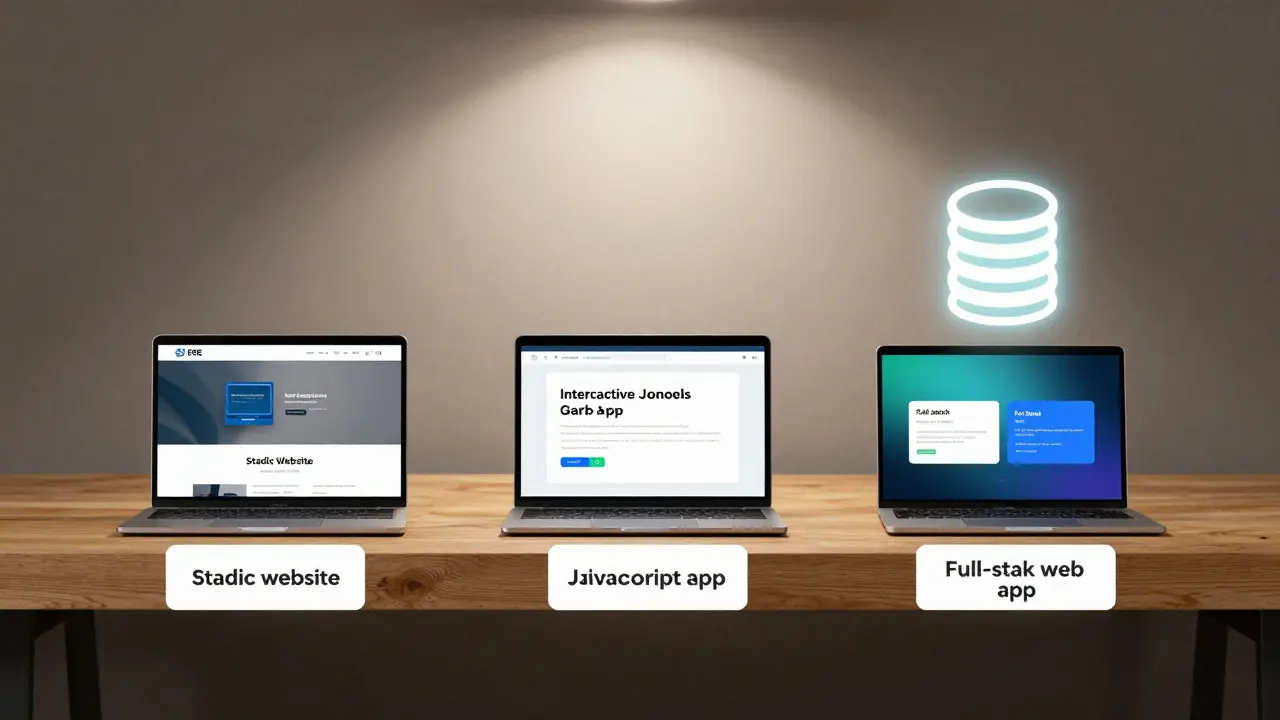
What to avoid
- Don’t copy a project from YouTube and call it yours. Employers can spot that. - Don’t build 10 tiny apps. Build 3 strong ones. - Don’t wait until the course ends to start. Start today. - Don’t use placeholder data. Use real APIs, real users, real inputs.Example project roadmap (for a 12-week course)
- Week 1-2: Personal portfolio site (HTML/CSS)
- Week 3-4: Weather app using a public API (JavaScript)
- Week 5-6: Task manager with local storage (JavaScript + JSON)
- Week 7-8: Blog with user comments (Python/Flask + SQLite)
- Week 9-10: Movie database with search and ratings (React + Node.js + MongoDB)
- Week 11-12: Deploy all projects, write READMEs, record a 2-minute demo video
Final thought: Your portfolio is your resume
You don’t need a degree to prove you can code. You need proof you’ve coded. Your portfolio projects are your resume. They’re your interview. They’re your voice. And they start with one line of code-today.What if I’m not good at design? Can I still build a good portfolio?
Absolutely. Employers care far more about how your code works than how your site looks. A clean, functional app with basic styling beats a flashy but broken one every time. Focus on functionality, clean structure, and clear documentation. Use free templates from Bootstrap or Tailwind if you need help with layout. The goal isn’t to be a designer-it’s to prove you can build something that works.
How many projects should I have in my portfolio?
Three to five strong projects are better than ten weak ones. Pick projects that show different skills-frontend, backend, databases, APIs. Quality matters more than quantity. A single full-stack app with user authentication, data storage, and deployment is more impressive than five static pages.
Should I use a framework like React or Vue for my first project?
Only if your course has taught you the basics of JavaScript first. Jumping into React without understanding DOM manipulation, events, or state can make you reliant on tutorials instead of learning. Build one project with vanilla JavaScript first. Then use React for your next one to see how it simplifies what you already built. This way, you’ll understand why frameworks exist-not just how to use them.
What if my project doesn’t work perfectly?
Perfect doesn’t matter. Functional does. If your app has bugs, document them in your README. Say: "I couldn’t fix the search filter on mobile-here’s what I tried." That shows you’re self-aware and proactive. Most junior developers hide their bugs. The ones who own them stand out.
I’m taking a course in Python. What’s a good first project?
Build a command-line journal. It lets you add entries with dates, tag them (e.g., #work, #mood), and search by tag. Store entries in a JSON file. Then upgrade it to have a simple web interface using Flask. This teaches file handling, data structures, and eventually web frameworks-all from one project that grows with your skills.

Comments (14)
Jen Becker February 12 2026
I built a weather app. It crashed on mobile. I cried. Then I fixed it. Now it works. That’s all that matters.
Ryan Toporowski February 14 2026
This is so true 😊 I went from zero to deployed in 3 weeks. Started with a tip calculator. Now I have 3 live projects. You got this! 💪🚀
Samuel Bennett February 15 2026
"Deploy early"? That’s a myth. Most beginners deploy broken shit and then blame the platform. You need to know what you’re doing first. Otherwise you’re just spamming the internet with 404s.
Rob D February 15 2026
You think GitHub is about coding? Nah. It’s about branding. The real game is making your repo look like a startup. I used neon CSS, animated SVGs, and a fake "used by 10k+ devs" badge. Got 3 interview calls in a week. Real coders don’t care about functionality-they care about vibes.
Franklin Hooper February 17 2026
The notion that one should "deploy early" is fundamentally flawed. Deployment requires infrastructure. Infrastructure requires understanding. Understanding requires time. Rushing this process is tantamount to architectural negligence.
Jess Ciro February 18 2026
They don’t want your code. They want your loyalty. The real test is whether you’ll work for free for 6 months to prove you "belong." That’s why they care about your GitHub. It’s not your skill-it’s your submission.
saravana kumar February 20 2026
Portfolio projects are irrelevant in India. Companies hire based on certifications from NASSCOM or TCS. No one checks GitHub. Build one project. Then apply for off-campus drives. That’s the real path.
Tamil selvan February 21 2026
I would like to respectfully suggest that the emphasis on deployment may overlook the foundational importance of code readability, maintainability, and adherence to industry-standard documentation practices. A well-documented, logically structured project-even if locally hosted-demonstrates a mature mindset far beyond a live URL.
Mark Brantner February 21 2026
Wait wait wait-you mean I don’t need to learn React before I can make a button work? 😱 I spent 3 weeks on React tutorials and now I realize… I could’ve just used onclick. My brain hurts. But also… I built a todo list. And it works. Kinda. Mostly. I think?
Kate Tran February 21 2026
I made a journal app. The UI is trash. But I fixed a bug where it deleted entries on reboot. That felt like a win. Also, I misspelled "favorite" in the README. Oops.
Anuj Kumar February 23 2026
Who even uses GitHub anymore? Real coders use private servers. This whole thing is a scam to make you show your work for free.
Christina Morgan February 23 2026
Just wanted to say this post made me feel seen. I built a movie tracker last month. It’s ugly. It’s basic. But I added a feature where it emails you a weekly recap. I didn’t know how to do that-I looked it up, failed 5 times, then got it. That moment? Priceless. Thanks for saying it’s okay to start small.
Kathy Yip February 24 2026
I wonder if the pressure to build "portfolio projects" distracts from the deeper question: why are we coding in the first place? Is it to impress employers? Or to solve problems we care about? Maybe the project doesn’t need to be seen by anyone. Maybe it just needs to matter to you.
Rocky Wyatt February 25 2026
I did everything right. Built three projects. Deployed them. Wrote READMEs. Got zero responses. Now I’m convinced the whole tech industry is run by bots who only hire people from Stanford. I’m done.